Altcraft Docs LogoAltcraft Docs Logo
User guide iconUser guide
Developer guide iconDeveloper guide
Admin guide iconAdmin guide
English
  • Русский
  • English
Login
    User documentationGetting StartedFAQAltcraft glossaryPlatform limits
      Profiles and databasesarrow
    • Subscription resourcesManaging databasesSubscriber profileProfiles import and data updateCommon Errors When Importing ProfilesScheduled customer data importManaging Data TablesAutomatic data collectionBulk customers profiles updateDouble opt-in subscriptionSuppression listsProfile relationsProfile history exportProfile exportCreating a static segment based on import resultsHow to open a CSV fileMatchingTypes of fields in the databaseGlobal control groupsSubscription Manager
      Communication channelsarrow
      • Email channelarrow
      • Email: ISP interactions best practices
          First mailingarrow
        • Quick StartEmail
        Email: sending domain configurationEmail: setting up and using postmastersHow email tracking works
        Push Channelarrow
        • Mobile Pusharrow
        • First Mobile Push Mailing
            Mobile Push Providersarrow
          • Firebase Cloud MessagingApple Push Notification ServiceHuawei Mobile ServicesRuStoreYandex.AppMetrica
          Integrate your app with Altcraft
            Deprecated: Manual Push Setuparrow
          • Deprecated: Setup and ConnectionProcessing and adding a subscriptionEvent registrationProviders: push message structure
          Web Pusharrow
        • First Web Push MailingResource and Website Setup
            Web Push Providersarrow
          • Firebase Cloud messagingApple SafariMozilla Services
          Transferring Data to the PlatformWeb Push SDK MethodsPWA and Push Notifications
            Migration and Subscription Transferarrow
          • Migrating push subscriptions from third-party servicesHow to transfer push subscriptions configured for Safari?Migration from OneSignal
        Push token deactivation
        SMS channelarrow
      • SMS
        In-Apparrow
      • First In-App PlacementSDK Setup and Integration
      WhatsAppViber*™
        Telegramarrow
      • Telegram BotTelegram Group
        Maxarrow
      • MAX BotMAX Group
      NotifyCommunication Channels WorkflowРуководство: SMS-рассылка через VK NotifyРуководство: SMS-рассылка через УТШРуководство: push-рассылка через сервис от "Согласие"
      Segmentationarrow
    • Static SegmentsDynamic SegmentsUpdatable Segments
        Segmentation Conditionsarrow
      • Segmentation by Profile dataSegmentation by Interactions with EntitiesSegmentation by Activity of the channel
          Segmentation by external dataarrow
        • Segmentation by external dataSegmentation by external SQL tablesRecommendations for segmentation by external data
        Segmentation by Profile structure
      Best Send Time (BST)Logical operators "AND" and "OR"Recommendations for working with segments
      Message templatesarrow
      • Working with message templatesarrow
      • Working in the editorEmail templateSMS templatePush templateTemplate for In-AppMAX templateTelegram templateWhatsApp templateViber templateNotify template
        Visual editor for email-templatearrow
      • Visual editor interfaceAdding blocksElements and their settingsCustom blocksElement stylesLayer manager
      Template fragmentsImage galleryContent personalizationCreating tables based on array elementsBlock editor for email template
        Altcraft Variables and Functionsarrow
      • Logical expressions in messagesLoops in messagesMarket variables in templatesUsing the JSONPath functionality
        Dynamic content in messagesarrow
      • Dynamic HTML contentDynamic JSON contentContent from SQL database in templatesDynamic API content
      Importing and exporting a message templateImporting a template from a third-party serviceExporting a template from Pixcraft
      Mailingsarrow
    • Broadcast mailingsTrigger mailingRegular mailingMultivariate testingMailing testingMailing schedulePlacementsMailings calendarMailing log — errors and troubleshootingManaging the Sender Queue
      Automation scenariosarrow
    • Managing scenariosScenario NodesClassic marketing scenariosStep-by-step welcome scenario guideScenario for automatic notification of the managerAbandoned cart scenarioCycle Handling in Automation ScenariosHigh-priority scenarios
      Campaignsarrow
    • Working with CampaignsLocal control groups (LCG)Stratification violation error when limit is reachedAudience expansion in campaignsAudience building
      Marketarrow
    • Market settings
        Productsarrow
      • How to create a product manuallyHow to import a product from a fileScheduled product importProduct and SKU SegmentsPreparing the YML file
      OrdersMarket variables in message templateGuide: how to send an order confirmation email
      Loyalty programsarrow
    • Loyalty programsLoyalty integration with external systemsCreating a loyalty program from scratchBasic loyalty program use casesOrder SegmentsPromotion codes
      Reports and analyticsarrow
    • Channel reportTraffic report
        Summary reportarrow
      • Summary report metrics
      Cohorts reportLifetime reportFunnels reportGoals reportAudience growth reportClick map reportLoyalty programs reportBounces reportUndeliveries reportReport on global control groups
      Weblayersarrow
      • Formsarrow
        • Create a formarrow
        • General settingsForm customization with custom codeForm constructorAppearanceActions and form publicationConditional logic in forms and surveys
        Data analyticsBinding data channel and formsNPS testing
        Pixelsarrow
      • Goal customer actions and scoring
        Pop-upsarrow
      • Creating and publishing a pop-upSetting up a popup in the code editorManaging pop-ups manually via scriptPopup analyticsGuide: pop-up for push subscriptionsCase: Creating a pop-up with the "Wheel of Fortune" widgetBasic cases of placing a popup via the Tag Manager
        Tag Managerarrow
      • Configuring and installing Tag ManagerTrigger typesVariable typesLinking a pixel and the Tag manager
      Settingsarrow
    • Account settingsCustom linksVirtual sendersSending policiesAudit journalTags FAQ
        Connectionsarrow
      • Connection to Facebook AdsConnection to Google AdsConnecting to Yandex.Audience™Connection to 360dialogConnection to EdnaConnection to Devino TelecomConnection to SMSTrafficConnection to VK Ads™Connection to MTS OmniChannelConnection via OAuth 2.0Basic Authentication connectionToken Authentication connectionCustom Authentication ConnectionConnecting to MAXConnection to NotifyConnection to Rapporto
        Users, groups and accessarrow
      • Password and login securityTwo-Factor Authentication (2FA)
      Attribute settings
      Integrationsarrow
    • Facebook Ads Manager
        Yandexarrow
      • Yandex AppMetricaYandex.Audience™
      Google Ads AudiencesWhatsAppStatic segment synchronizationViberVK AdsNotifyMAX
        Action hooksarrow
      • Lpgenerator™Tilda™Altcraft Action HooksAction hooks event typesEvent Capture Message StructuresJSON batch request (HTTP POST action hook)Message to RabbitMQ brokerMessage to RabbitMQ exchangerMessage to Kafka brokerTest event
        Integration of third-party services using Albatoarrow
      • Connecting Altcraft to Albato Launching the welcome scenario using AlbatoTransmitting event dataSetting up a trigger mailingEvent registrationGoogle Sheets and Altcraft integration AmoCRM and Altcraft integration
        Additional Informationarrow
      • Integration scopeData Transmitted During Synchronization
      API requests: where to startarrow
    • Import or update a profileTrigger mailing launchEngage profile in scenario
      Changelogarrow
    • v2026.3.79v2026.3.78v2026.2.77v2026.1.76v2025.4.75v2025.4.74v2025.3.73v2025.2.72v2025.1.71v2024.4.70v2024.3.69v2024.2.68.2v2024.1.68
    Documentation archiveEmail Marketer's Library
  • Profiles and databases
  • Matching

Matching

Matching is the process of searching and identifying existing customer profiles in a database by specific data. It is used to update customer information and prevent the creation of duplicate records in the database.

When importing profiles into the database (from a file, via API query or from an external SQL table), you specify the profile search mode:
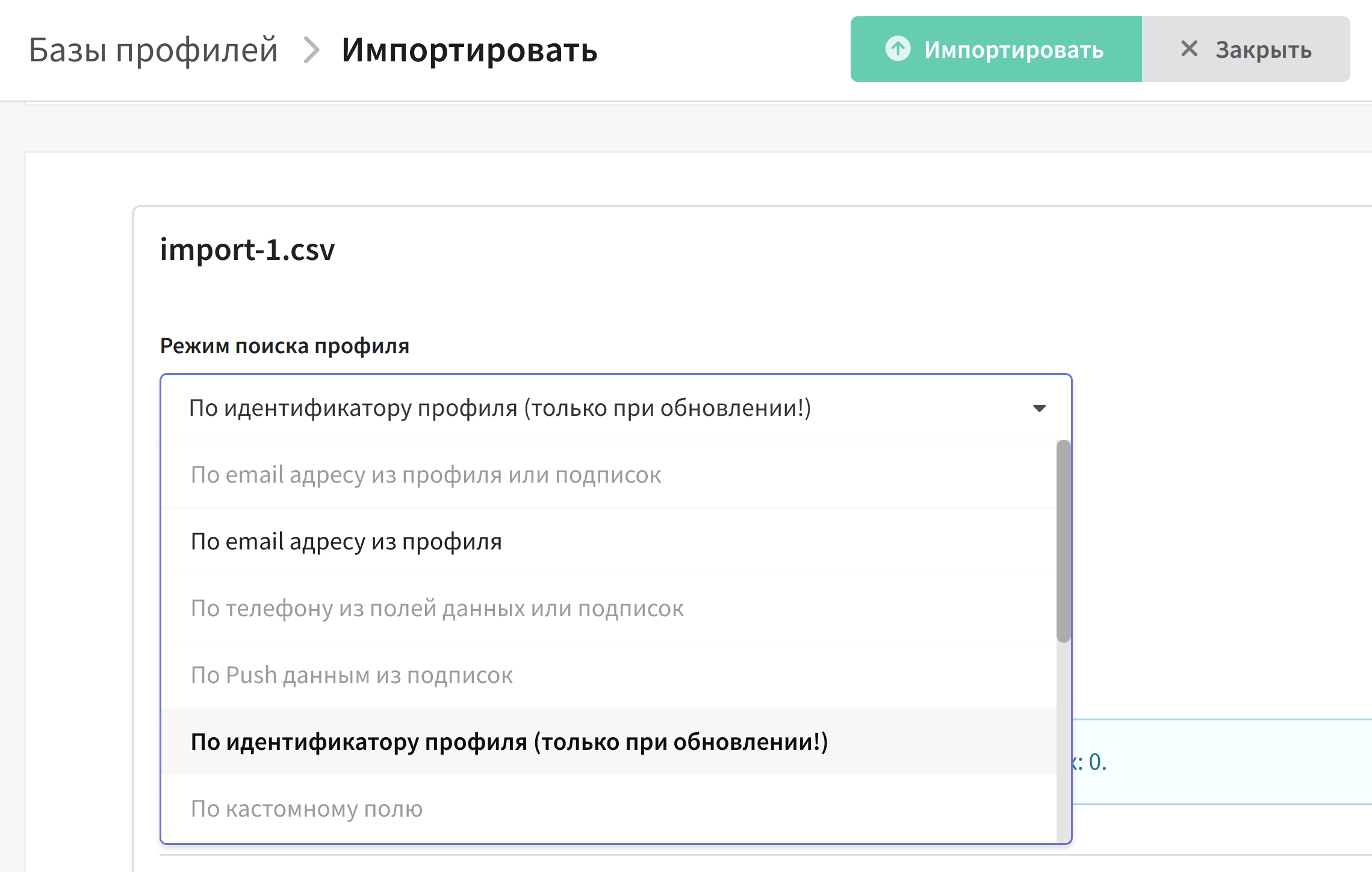
During the import process, the platform compares this data with what is already in the database. If it finds a profile with the same data, it updates it. If it doesn't find it, it creates a new profile.

Note, the data you are going to use for the search must be in the source. For example, if you are importing data from a file and select email search mode, make sure you have a column with email addresses in your file.

Matching modes​

The following modes are available:

  • By email, from profile or subscriptions - search by email from database or subscriptions.
  • By email from profile - search by database profile email.
  • By email from subscriptions - search by email from subscriptions only.
  • By phone, from profile or subscriptions - search by phone in database field or SMS subscriptions.
  • By phone from SMS subscriptions - search by phone from SMS subscriptions only.
  • By push data from subscriptions - search by the identifier of push subscription (device token).
  • By device identifier (device_id) from the In-App channel subscription
  • By profile identifier - search by system identifier profile_id.
  • By user-defined field - search by a user-defined database field, like customer ID in company CRM.
  • By user-defined field from subscriptions- search by a user-defined database field from subscriptions only.
  • Multimatching - by Email or phone from profile and subscriptions (email_phone), or by email or phone from subscriptions (email_phone_sub).

Matching features​

There are several important nuances related to matchmaking:

  • The field by which the search is performed must be unique for each profile. The value of this field should not be the same for different profiles in the same database.
  • It is not recommended to use different types of matching in the same database to avoid duplicate profiles.
  • If you do not pass the search mode in the matching field when importing or updating profiles via API, the platform will search for the profile by email address.
info

If you are going to use custom field matching, you should contact the platform administrator to create an index for this field. Thanks to the index, searching for a profile in the database will take much less time.

Profile processing mechanism​

When the platform receives customer data (from a file, via API, or from an external SQL table), it processes it in the following order:

1. Profile search. The platform searches the database for a profile whose search field value matches the data from the source.

  • A profile is found — it is updated.
  • No profile is found — a new profile is created.
  • If the profile search mode is not passed in an API request, the platform searches by email address.

2. Import mode. Depending on the selected import method, the platform may react differently to a found or not found profile:

  • Add new and update existing — found profiles are updated, and not found ones are created.
  • Only add new, do not update existing — if a profile with such data already exists in the database, the record is skipped: the existing profile is not updated, and a new one is not created.
  • Only update existing, do not add new — if a profile is not found, a new one is not created: the record is skipped.

3. Field update. Only the fields that are passed in the data are updated. The values of the other profile fields remain unchanged.

  • By default, an empty value in the source overwrites the current field value in the database.
  • If the "Ignore empty values" option is enabled, empty values do not update the fields — the previous content stays in them.

4. Tags. Tags passed in the data are added to the profile's existing tags: existing tags are not removed.

5. Subscriptions. Subscriptions to resources are added and updated according to the subscription settings. In unsafe mode, the subscriptions of profiles with the Unsubscribed, Complained, Hardbounced, and Invalid statuses are also updated.

tip

If no email is passed when creating a new profile, a system record in the form profile_id@localhost is written to the Email field.

Last updated on Sep 28, 2026
Previous
How to open a CSV file
Next
Types of fields in the database
  • Matching modes
  • Matching features
  • Profile processing mechanism
© 2015 - 2026 Altcraft, LLC. All rights reserved.