Firebase Cloud Messaging
Step 1. Firebase Cloud Messaging project setup
- Create a Firebase project;
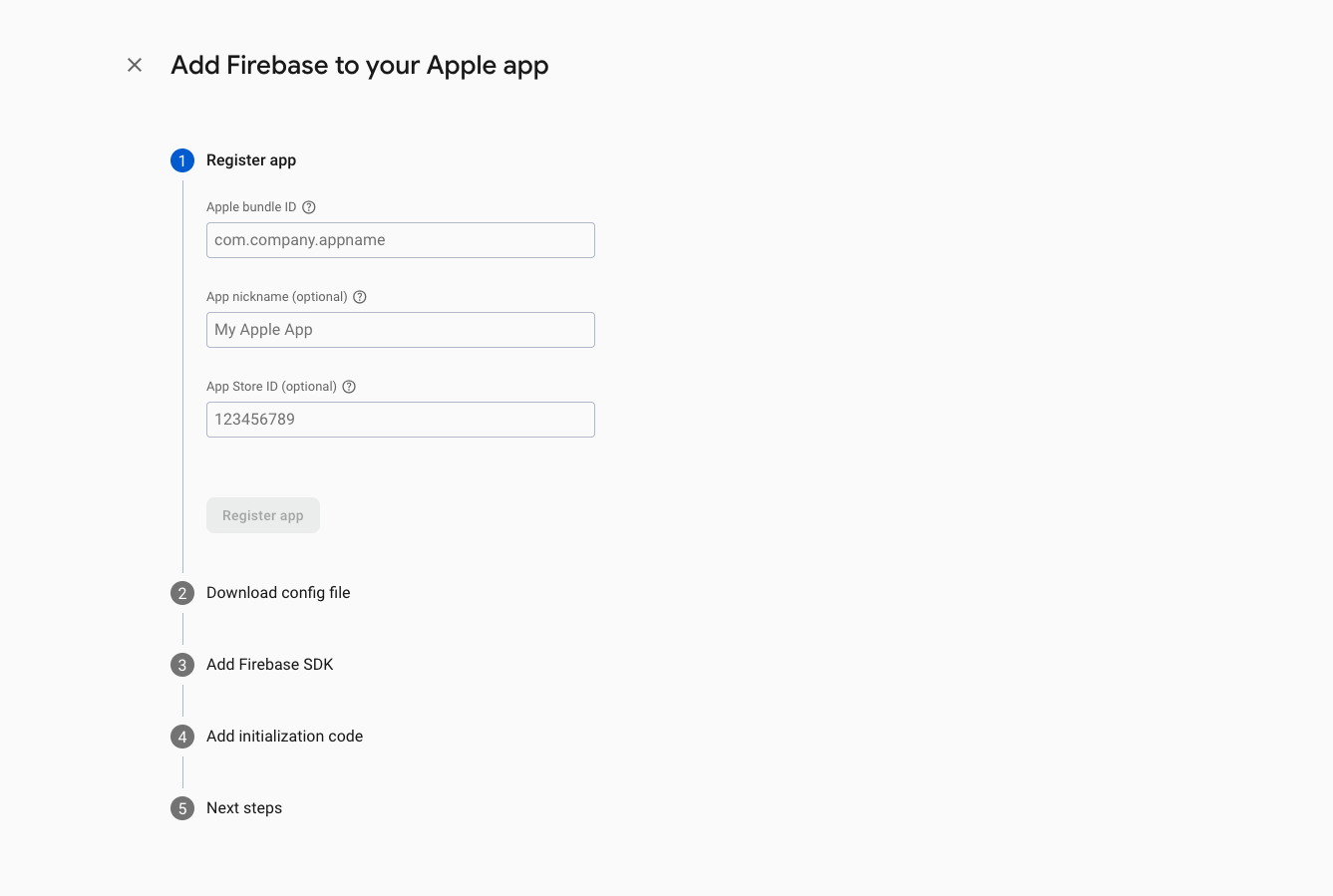
- Register a new application in the project:
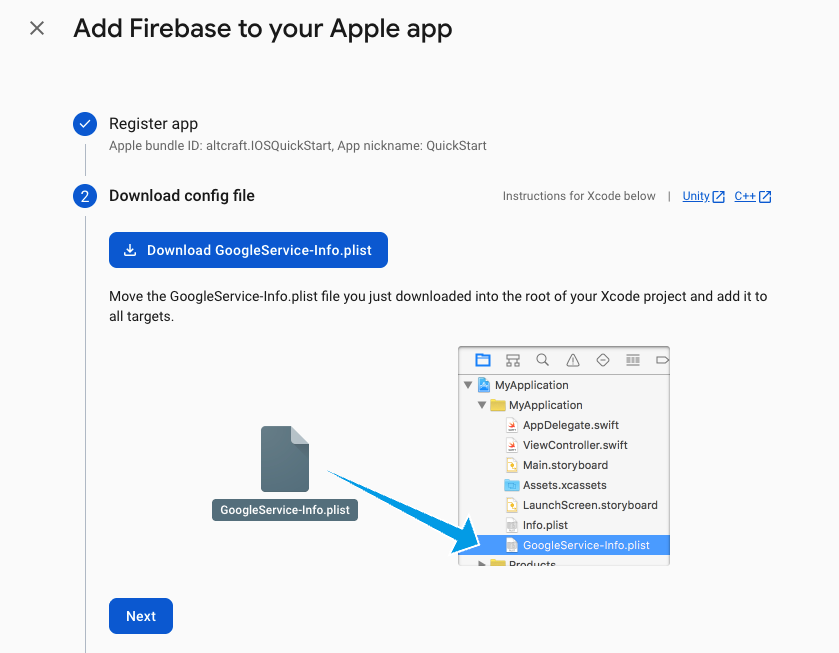
- Download
GoogleService-Info.plist;
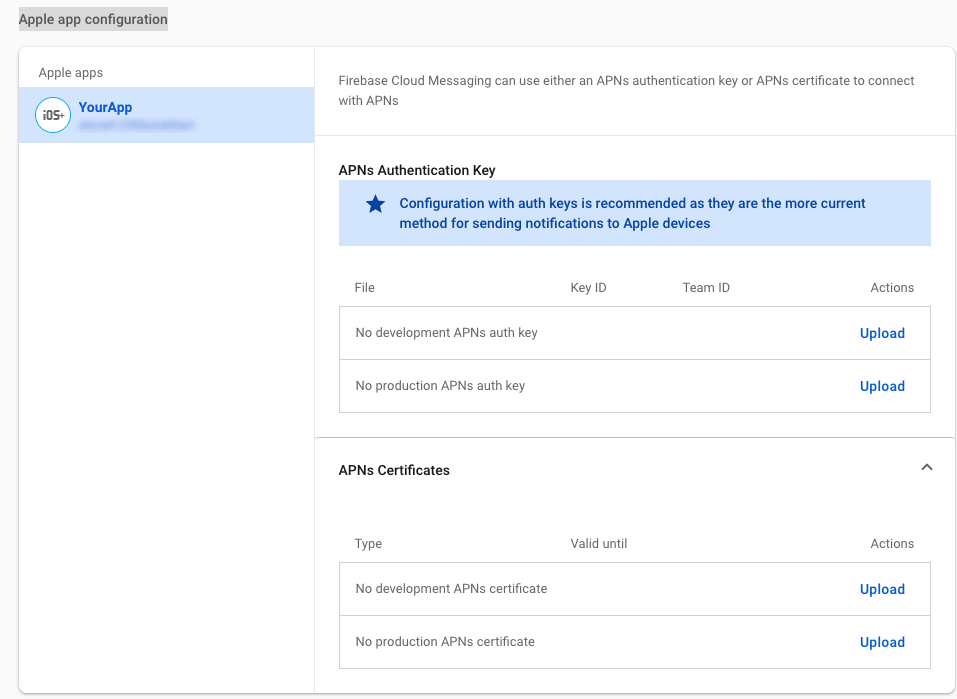
- In the project settings, go to Cloud Messaging — Apple app configuration;
- Add the required APNs Authentication Key data (create the key in advance on Apple Developer):
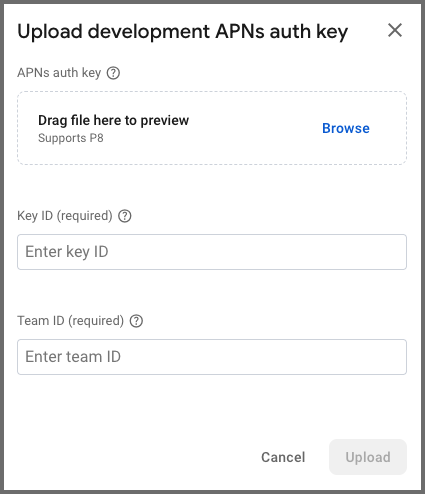
Specify the following data:
- upload the downloaded .p8 file
- specify the
key ID - specify the
team ID
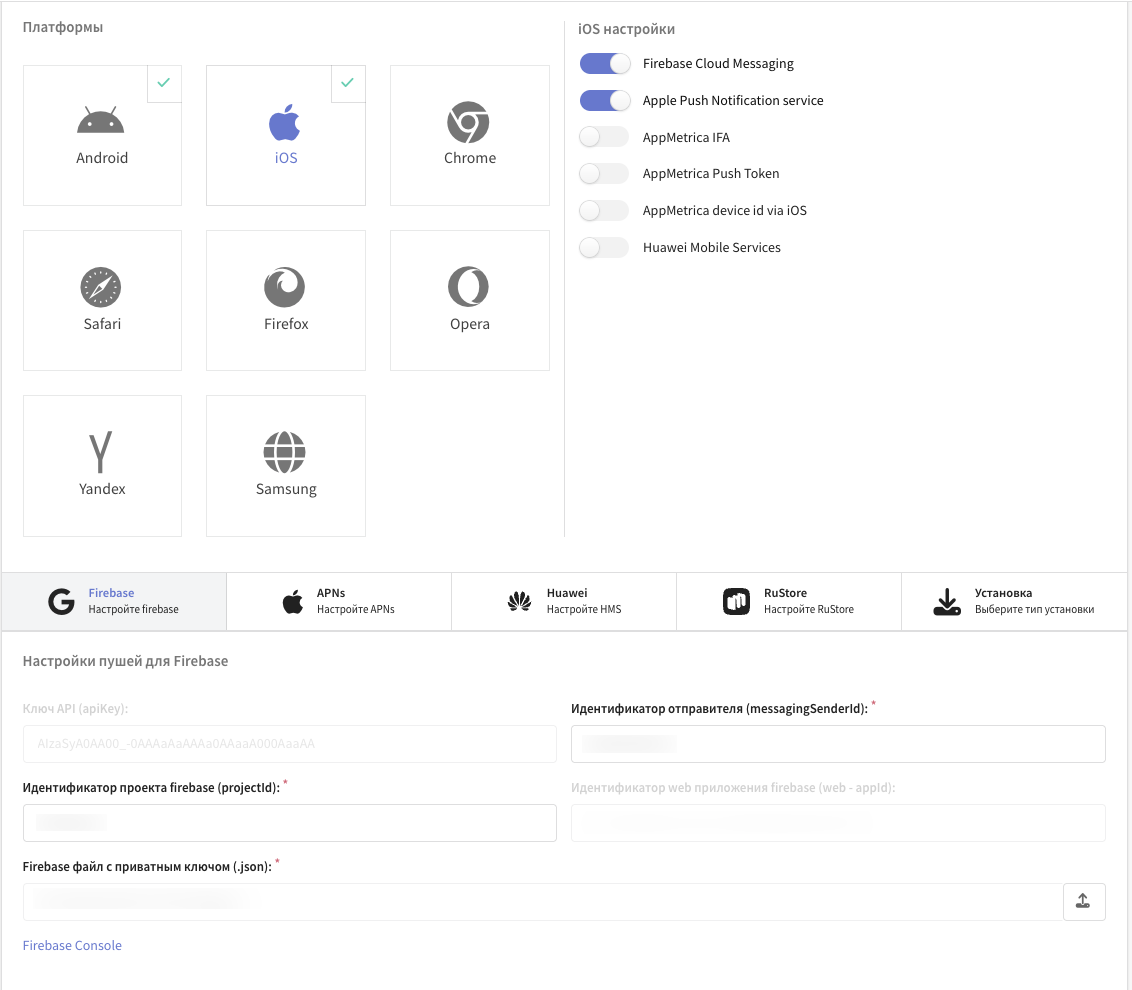
Step 2. Altcraft resource setup
- Specify
messagingSenderId; - Specify
projectId; - Upload the Firebase private key file (.json). The file is created in the Project settings — Service account section.
Step 3. Integrating Firebase Cloud Messaging into the app project
-
Move the downloaded
GoogleService-Info.plistfile to the app folder (app); -
Add the Firebase package using Swift Package Manager — repository Firebase. The Firebase package version must be compatible with the XCODE version.
-
General:
- Make sure the FirebaseMessaging library is added to the app target's Frameworks, Libraries, and Embedded Content.
-
Signing & Capabilities:
- PushNotifications;
Option 1: FirebaseAppDelegateProxyEnabled — YES (the default for Firebase Messaging)
-
Add the
MessagingDelegateprotocol toAppDelegate:class AppDelegate: UIResponder, UIApplicationDelegate, MessagingDelegate {}
This lets you receive the callback with the current FCM token through the messaging(_:didReceiveRegistrationToken:) method.
-
Initialize Firebase in
didFinishLaunchingWithOptions:FirebaseApp.configure()
Messaging.messaging().delegate = self
application.registerForRemoteNotifications() -
Implement the delegate method to receive the token:
func messaging(_ messaging: Messaging, didReceiveRegistrationToken fcmToken: String?) {
    guard let token = fcmToken else { return }
    print(" FCM Token: \(token)")
}
Full example of initializing Firebase and receiving the FCM token
import SwiftUI
import FirebaseCore
import FirebaseMessaging
import Altcraft

@main
struct IOSQuickStartApp: App {
   @UIApplicationDelegateAdaptor(AppDelegate.self) var delegate

   var body: some Scene {
       WindowGroup {
           ContentView()
       }
   }
}

class AppDelegate: UIResponder, UIApplicationDelegate, MessagingDelegate, UNUserNotificationCenterDelegate {
   func application(
       _ application: UIApplication,
       didFinishLaunchingWithOptions launchOptions: [UIApplication.LaunchOptionsKey: Any]?
   ) -> Bool {
       /// Initialize Firebase
       FirebaseApp.configure()
       /// Set the delegate
       Messaging.messaging().delegate = self
       application.registerForRemoteNotifications()

       return true
   }

   func messaging(_ messaging: Messaging, didReceiveRegistrationToken fcmToken: String?) {
       if let token = fcmToken {
          // FCM token
       }
   }
}
Option 2: FirebaseAppDelegateProxyEnabled - NO
-
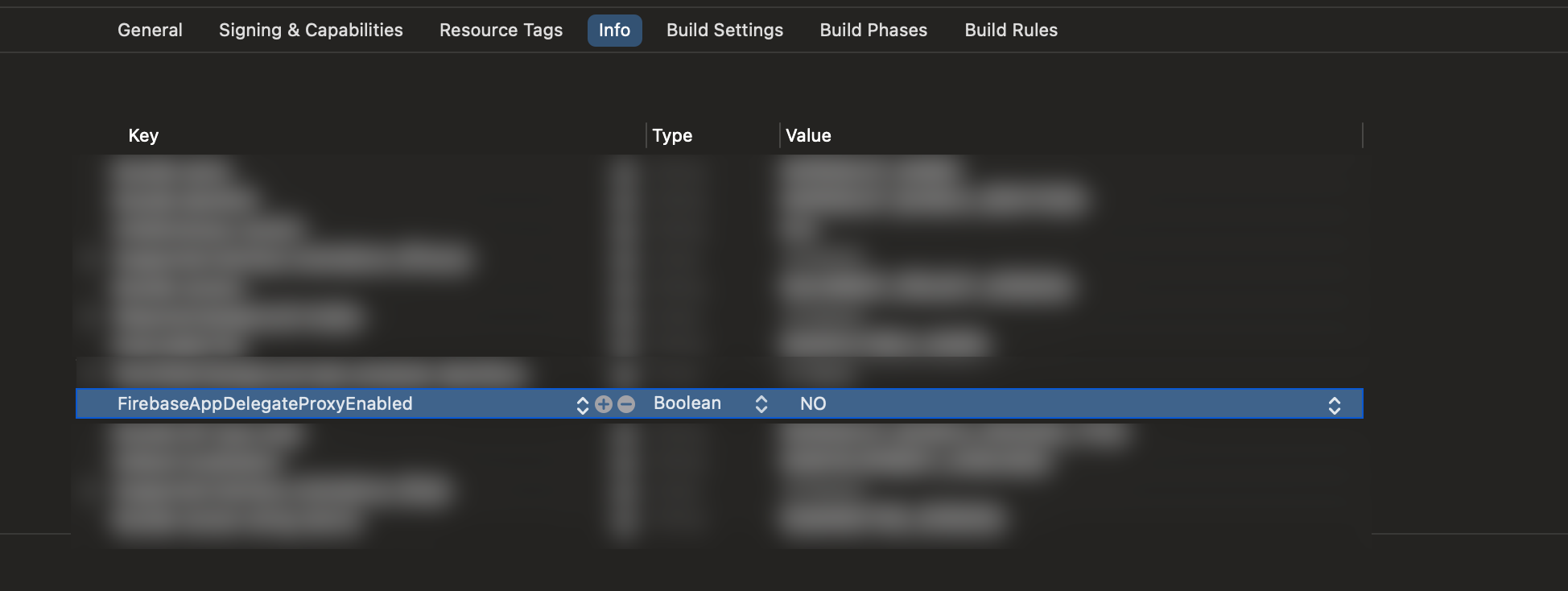
In the app target settings:
- Info:
- Add the
FirebaseAppDelegateProxyEnabled (Boolean)key with the valueNOto the app's Info.
- Add the
- Info:
-
The
MessagingDelegateprotocol is not required in this case. WithFirebaseAppDelegateProxyEnableddisabled, Firebase does not perform automatic swizzling ofAppDelegate. The SDK requests tokens through the app-implemented providers (FCMInterface,APNSInterface), so theMessagingDelegatedelegate is not needed in this case. -
Initialize Firebase in
didFinishLaunchingWithOptions:
   func application(
       _ application: UIApplication,
       didFinishLaunchingWithOptions launchOptions: [UIApplication.LaunchOptionsKey: Any]?
   ) -> Bool {
       FirebaseApp.configure()
       return true
   }
- Receive and save the APNs token in
didRegisterForRemoteNotificationsWithDeviceToken:
class AppDelegate: UIResponder, UIApplicationDelegate, UNUserNotificationCenterDelegate {
    func application(
        _ application: UIApplication,
        didFinishLaunchingWithOptions launchOptions: [UIApplication.LaunchOptionsKey: Any]?
    ) -> Bool {
        FirebaseApp.configure()
        return true
    }

    func application(
        _ application: UIApplication,
        didRegisterForRemoteNotificationsWithDeviceToken apnsToken: Data
    ) {
        // Save the token for later use when requesting the FCM token
        setAPNsTokenInUserDefault(apnsToken)
    }
}
Step 4. Manually setting the APNs token in Firebase Messaging before requesting the FCM token
Example inside the SDK provider
import FirebaseMessaging
import Altcraft

class FCMProvider: FCMInterface {

    /// Retrieves the current FCM token
    func getToken(completion: @escaping (String?) -> Void) {

        /// The APNs token retrieved from UserDefaults
        let apnsToken = getAPNsTokenDataFromUserDefaults()

        /// Set the APNs token manually before requesting the FCM token
        Messaging.messaging().apnsToken = apnsToken

        /// Request the FCM token
        Messaging.messaging().token { token, error in
            if error != nil {
                completion(nil)
            } else {
                completion(token)
            }
        }
    }

    /// Deletes the current FCM token
    func deleteToken(completion: @escaping (Bool) -> Void) {
        Messaging.messaging().deleteToken { error in
            if error != nil {
                completion(false)
            } else {
                completion(true)
            }
        }
    }
}